Pin Diagram and Functional Description
Pin Diagram
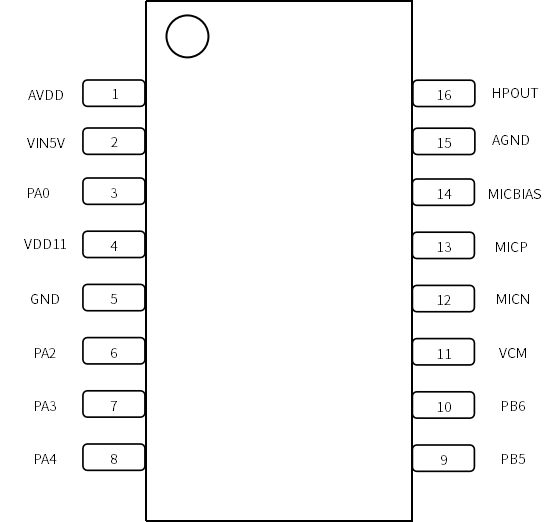
Pin Description
| Pin No. | Pin Name | Type | 5V Tolerant | Default State | Pin Function |
|---|---|---|---|---|---|
| 1 | AVDD | P | - | - | ● Internal LDO-3.3V Output ● 3.3V Power Supply for Analog Circuitry Note1 |
| 2 | VIN5V | P | - | - | ● Power Supply Input (3.6V~5.5V) Note1 |
| 3 | PA0 | IO | - | - | ● XIN (Default at Power-on) ● GPIO PA0 ● PWM2 |
| 4 | VDD11 | P | - | - | ● LDO-1.1V Output ● 1.1V Core Power Supply Note1 |
| 5 | GND | P | - | - | Ground |
| 6 | PA2 | IO | √ | IN,T+D | ● GPIO PA2 (Default at Power-on) ● IIC_SDA ● UART1_TX ● PWM0 ● PWMP |
| 7 | PA3 | IO | √ | IN,T+D | ● GPIO PA3 (Default at Power-on) ● IIC_SCL ● UART1_RX1 ● PWM1 ● PWMN |
| 8 | PA4 | IO | √ | IN,T+U | ● GPIO PA4 (Default at Power-on)/PG_EN Note2 ● PWM2 |
| 9 | PB5 | IO | √ | IN,T+U | ● GPIO PB5 (Default at Power-on) ● UART0_TX ● IIC_SDA ● PWM1 ● PWMP |
| 10 | PB6 | IO | √ | IN,T+U | ● GPIO PB6 (Default at Power-on) ● UART0_RX ● IIC_SCL ● PWM2 ● PWMN |
| 11 | VCM | O | - | - | VCM Output |
| 12 | MICN | I | - | - | Microphone N Input |
| 13 | MICP | I | - | - | Microphone P Input |
| 14 | MICBIAS | O | - | - | Microphone Bias Output |
| 15 | AGND | P | - | - | Analog Ground |
| 16 | HPOUT | O | - | - | DAC Output |
Note1: A 4.7uF external capacitor is required for this pin
Note2: System enters programming mode when this pin is high during power-on
Symbol Definition
I Input
O Output
IO Bidirectional
P Power or Ground
T+D Tri-state with Pull-down
T+U Tri-state with Pull-up
OUT Default to Output mode at power-on
IN Default to Input mode at power-on
All IOs support configurable drive strength and pull-up/down resistors.
Multiplexing Functions
| Pin Number | Function1 | Function2 | Function3 | Function4 | Function5 | Function6 | Specific Function |
|---|---|---|---|---|---|---|---|
| PA0 | PA0 | PWM2 | - | - | - | - | XIN |
| PA2 | PA2 | - | IIC_SDA | UART1_TX | PWM0 | PWMP | - |
| PA3 | PA3 | - | IIC_SCL | UART1_RX | PWM1 | PWMN | - |
| PA4 | PA4 | - | - | - | PWM2 | - | PG_EN Note3 |
| PB5 | PB5 | UART0_TX | IIC_SDA | PWM1 | PWMP | - | - |
| PB6 | PB6 | UART0_RX | IIC_SCL | PWM2 | PWMN | - | - |
Note3: The PA4 (PG_EN) pin has an internal pull-up by default. If the system detects this pin is high during power-on and there is a Firmware Update signal on the UART0 interface, it will automatically enter programming mode, allowing the internal Flash to be programmed using the upgrade tool. If no Firmware Update signal is detected on the UART0 interface or if the PA4 pin voltage is low, the system will enter normal operation mode.