Enterprise Verification
After registering an account on the platform, users are by default assigned regular user status. However, users have the option to upgrade to an enterprise account free of charge. The platform distinguishes between regular and enterprise users to provide personalized experiences and services tailored to different user needs and expectations, while maximizing the advantages of each account type.
To activate enterprise features, users can complete the “Enterprise Verification” process by following these steps:
1. Access the Enterprise Verification Page
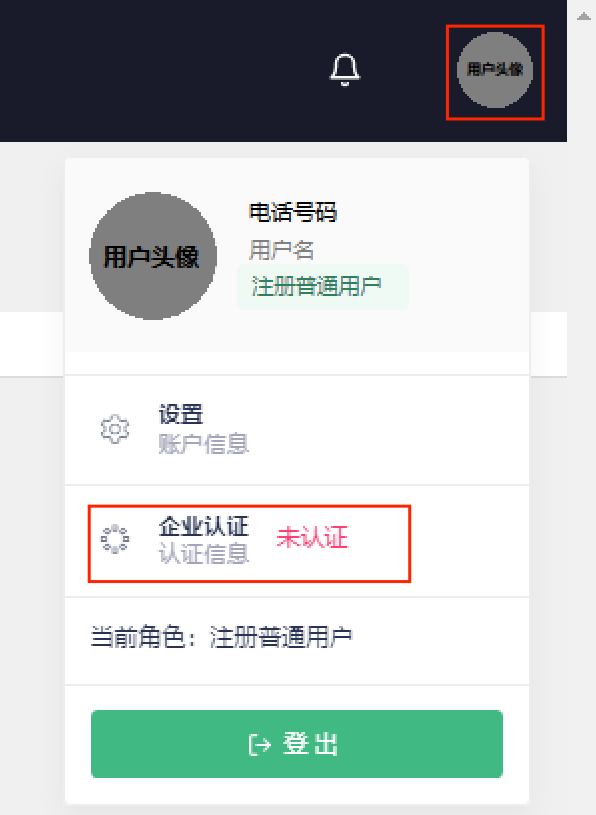
Step 1: Click on the user profile icon in the top-right corner of the Voice AI Platform, then select “Enterprise Verification” from the dropdown menu.
2. Submit Verification Documents
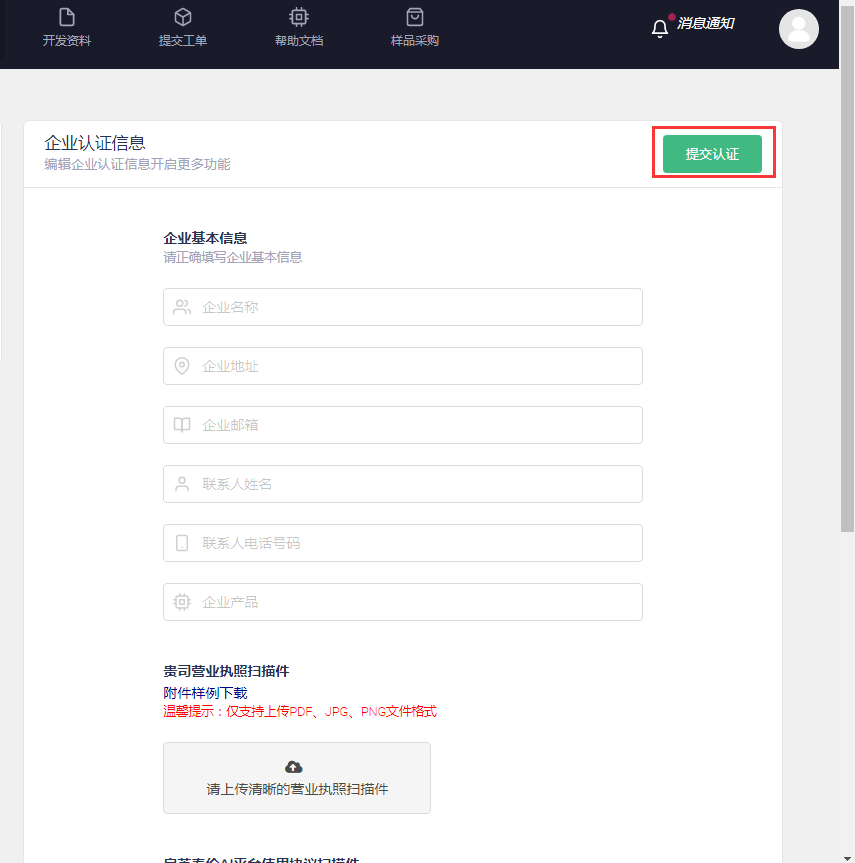
Step 2: As shown in the image below, fill in the required information, upload the necessary documents, and click the “Submit for Verification” button. Our team will review your submission (processing time is approximately one business day).
3. Complete Enterprise Verification
Step 3: Once the review is complete, our technical team will grant the appropriate enterprise-level permissions to verified users.