Offline Commands Self-Learning User Guide
1. Overview
This document provides instructions for the offline commands self-learning project in the single-microphone offline SDK (version CI13XX_SDK_ASR_Offline_V1.5.7 and above) for the V3 CI13XX series chips. It covers the concept, application scenarios, quick start, and important notes for offline commands self-learning.
2. Basic Concept of Offline Commands Self-Learning
In offline mode, users can modify default command words through voice interaction. This customization capability meets end-users’ personalized needs and delivers an enhanced user experience.
3. Application Scenarios
This solution is suitable for various voice-controlled smart home appliances and IoT products that require offline command word customization.
4. Project Description
The CI13XX_SDK_ASR_Offline includes a demo for command word self-learning, located in the projects\cwsl_sample directory. After compilation and download, the feature is ready to use.
5. Quick Start
The underlying code for offline commands self-learning is located in CI130X_SDK\components\ci_cwsl, while the application layer code can be found in CI130X_SDK\projects\cwsl_sample\src (see cwsl_app_sample1.c and cwsl_app_sample1.h). All functions include detailed comments. This document highlights some of the key functions.
/*
 * @brief Command word self-learning message handler
 * @param asr_msg ASR recognition result message
 * @param cmd_handle Command word handle
 * @param cmd_id Command word ID
 * @retval 1 Data valid, message processed
 * @retval 0 Data invalid, message not processed
 */
uint32_t cwsl_app_process_asr_msg(sys_msg_asr_data_t *asr_msg, cmd_handle_t *cmd_handle, uint16_t cmd_id)
/*
 * @brief Module initialization event handler, called during command word self-learning parameter initialization
 * @param cwsl_init_parameter Parameter pointer
 * @retval 1 Must return the number of learnable templates
 */
int on_cwsl_init(cwsl_init_parameter_t *cwsl_init_parameter)
/*
 * @brief Learning start event handler, called at the beginning of each learning session
 * @param cmd_id Command word ID
 * @param group_id Group ID
 * @param word_type Learning type: CMD_WORD for command word, WAKEUP_WORD for wake word
 * @retval 0
 */
int on_cwsl_reg_start(uint32_t cmd_id, uint16_t group_id, cwsl_word_type_t word_type)
/*
 * @brief Learning stop event handler
 * @param None
 * @retval 0
 */
int on_cwsl_reg_abort()
/*
 * @brief Recording start event handler
 * @param None
 * @retval 0
 */
int on_cwsl_record_start()
/*
 * @brief Recording end event handler
 * @param times Current learning repetition count
 * @param result Current learning result status: learning success, learning failure, ...
 * @retval 0
 */
int on_cwsl_record_end(int times, cwsl_reg_result_t result)
/*
 * @brief Template deletion success event handler
 * @retval 0
 */
int on_cwsl_delete_successed()
/*
 * @brief Recognition success event handler
 * @param cmd_id Command word ID
 * @param distance Unused parameter, currently invalid
 * @retval 0
 */
int on_cwsl_rgz_successed(uint16_t cmd_id, uint32_t distance)
/*
 * @brief Start learning a command word
 * @param word_type Learning type: CMD_WORD for command word, WAKEUP_WORD for wake word
 * @retval 0
 */
void cwsl_app_reg_word(cwsl_word_type_t word_type)
/*
 * @brief Delete a specified type of template
 * @param cmd_id Command word ID to delete, -1 for wildcard, ignoring this parameter
 * @param group_id Group ID to delete, -1 for wildcard, ignoring this parameter
 * @param word_type Type of command word to delete, -1 for wildcard, ignoring this parameter
 * @retval None
 */
void cwsl_app_delete_word(uint32_t cmd_id, uint16_t group_id, cwsl_word_type_t word_type)
5.1 Macro Definitions for Offline Commands Self-Learning
In CI130X_SDK\projects\cwsl_sample\src, open the user_config.h file.
#define USE_CWSL 1 //1: Enable offline commands self-learning, 0: Disable
Note
The cwsl_sample project has offline commands self-learning enabled by default.
In CI130X_SDK\system, open the sdk_default_config.h file.
#define CICWSL_TOTAL_TEMPLATE 6 //Number of storable templates for offline commands self-learning, default is 6
Note
The current maximum number of test templates is 20.
5.2 Wake Word and Command Word Configuration
In CI130X_SDK\projects\cwsl_sample\src, open the cwsl_app_sample1.c file.
#define CWSL_WAKEUP_NUMBER         2 // Number of learnable wake words
#define WAKE_UP_ID                 1 // Command word ID for the wake word
#define CWSL_CMD_NUMBER            ((sizeof(reg_cmd_list) / sizeof(reg_cmd_list[0]))) // Number of learnable command words
5.3 Voice Prompt Configuration for Command Word Learning
Configuring the reg_cmd_list Structure Array
In CI130X_SDK\projects\cwsl_sample\src, open the cwsl_app_sample1.c file.
//Left column: Command word ID to be learned, Right column: Voice prompt ID to be played
const cwsl_reg_asr_struct_t reg_cmd_list[]=
{ //Command Word ID  //Voice Prompt ID
    {2,             1001},
    {3,             1002},
    {4,             1003},
    {5,             1004},
    {6,             1005},
    {7,             1006},
};
Configuring the Command Word List
In CI130X_SDK\projects\cwsl_sample\firmware\user_file\cmd_info, open the [60000]cmd_info.xlsx file.
Note
The “Command Word” column in the table below is for indicating which word is being prompted. The format is flexible and doesn’t need to match the example exactly.
| Command Word | Command Word ID | Semantic ID | Confidence | Wake Word | Combined Word | Expected Word | Unexpected Word | Special Word Count | Prompt Type | Prompt 1 ID | Prompt 2 ID |
|---|---|---|---|---|---|---|---|---|---|---|---|
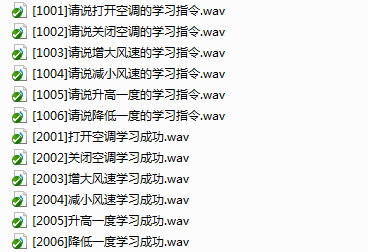
| [1001]Please say the learning command to turn on the air conditioner[103]Congratulations[2001]Successfully learned to turn on the air conditioner | 1001 | 0x00 | 39 | NO | NO | NO | NO | 0 | Custom | 1001 | 103+2001 |
| [1002]Please say the learning command to turn off the air conditioner[103]Congratulations[2002]Successfully learned to turn off the air conditioner | 1002 | 0x00 | 39 | NO | NO | NO | NO | 0 | Custom | 1002 | 103+2002 |
| [1003]Please say the learning command to increase fan speed[103]Congratulations[2003]Successfully learned to increase fan speed | 1003 | 0x00 | 39 | NO | NO | NO | NO | 0 | Custom | 1003 | 103+2003 |
| [1004]Please say the learning command to decrease fan speed[103]Congratulations[2004]Successfully learned to decrease fan speed | 1004 | 0x00 | 39 | NO | NO | NO | NO | 0 | Custom | 1004 | 103+2004 |
| [1005]Please say the learning command to increase temperature by 1 degree[103]Congratulations[2005]Successfully learned to increase temperature by 1 degree | 1005 | 0x00 | 39 | NO | NO | NO | NO | 0 | Custom | 1005 | 103+2005 |
| [1006]Please say the learning command to decrease temperature by 1 degree[103]Congratulations[2006]Successfully learned to decrease temperature by 1 degree | 1006 | 0x00 | 39 | NO | NO | NO | NO | 0 | Custom | 1006 | 103+2006 |
Adding Corresponding Voice Prompts
Add the voice prompt files to the CI130X_SDK\projects\cwsl_sample\firmware\voice\src directory.
5.4 Additional Parameter Configuration
In CI130X_SDK\projects\cwsl_sample\src, open the cwsl_app_sample1.c file.
#define CWSL_REG_TIMES              (1)                        // Number of repetitions required for learning each word (default: 1, supports 1-2 repetitions, maximum: 2)
#define CWSL_TPL_MINWORD            (2)                        // Minimum word count for self-learning templates (default: 2, can be set to 2 or 3)
#define CWSL_WAKEUP_THRESHOLD       (37)                       // Wake word threshold for learning (lower is more sensitive, default: 37, minimum: 32)
#define CWSL_CMD_THRESHOLD          (35)                       // Command word threshold for learning (lower is more sensitive, default: 35, minimum: 30)
#define MAX_LEARN_REPEAT_NUMBER     ( CWSL_REG_TIMES + 2 )     // Maximum number of learning repetitions
5.5 Default Command Words for Offline Commands Self-Learning
Currently, the command word self-learning demo provides a standard workflow for wake words and command words. If users need to use the command word self-learning feature, they need to update the language model (ASR), command word table, and voice prompts. The specific methods are as follows:
Language Model (ASR) Update
Learning Wake Word
Learn Command Words
Re-learn
Exit Learning
I want to delete
Delete Wake Word
Delete Command Words
Exit Deletion
Delete All
Note
The language model (ASR) currently only supports the Chinese model (except for the low false alarm model).
Added Command Words in the Table:
| Command Word | ID | 0x00 | 39 | NO | NO | NO | NO | 0 | Custom | 200 | |
|---|---|---|---|---|---|---|---|---|---|---|---|
| Learn Wake Word | 200 | 0x00 | 39 | NO | NO | NO | NO | 0 | Custom | 200 | |
| Learn Command Words | 201 | 0x00 | 39 | NO | NO | NO | NO | 0 | Custom | 201 | |
| Re-learn | 202 | 0x00 | 41 | NO | NO | NO | NO | 0 | Custom | 200 | 201 |
| Exit Learning | 203 | 0x00 | 41 | NO | NO | NO | NO | 0 | Custom | 203 | |
| I want to delete | 204 | 0x00 | 41 | NO | NO | NO | NO | 0 | Custom | 204 | |
| Delete Wake Word | 205 | 0x00 | 39 | NO | NO | NO | NO | 0 | Custom | 205 | |
| Delete Command Words | 206 | 0x00 | 39 | NO | NO | NO | NO | 0 | Custom | 206 | |
| Exit Deletion | 207 | 0x00 | 41 | NO | NO | NO | NO | 0 | Custom | 207 | |
| Delete All | 208 | 0x00 | 41 | NO | NO | NO | NO | 0 | Custom | 208 |
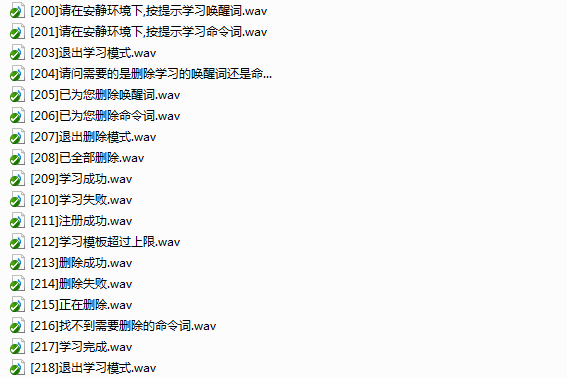
If you modify the Command Word ID in the command word list under CI130X_SDK\projects\cwsl_sample\firmware\user_file\cmd_info, you also need to update the cicwsl_func_index enumeration in the CI130X_SDK\projects\cwsl_sample\src\cwsl_app_sample1.h file. The enumeration is as follows:
typedef enum
{
    CWSL_REGISTRATION_WAKE          = 200,      ///< Command Word: Learn Wake Word
    CWSL_REGISTRATION_CMD           = 201,      ///< Command Word: Learn Command Words
    CWSL_REGISTER_AGAIN             = 202,      ///< Command Word: Re-learn
    CWSL_EXIT_REGISTRATION          = 203,      ///< Command Word: Exit Learning
    CWSL_DELETE_FUNC                = 204,      ///< Command Word: I want to delete
    CWSL_DELETE_WAKE                = 205,      ///< Command Word: Delete Wake Word
    CWSL_DELETE_CMD                 = 206,      ///< Command Word: Delete Command Words
    CWSL_EXIT_DELETE                = 207,      ///< Command Word: Exit Deletion Mode
    CWSL_DELETE_ALL                 = 208,      ///< Command Word: Delete All

    CWSL_DATA_ENTERY_SUCCESSFUL     = 209,      ///< Voice Prompt: Learning Successful
    CWSL_DATA_ENTERY_FAILED         = 210,      ///< Voice Prompt: Learning Failed
    CWSL_REGISTRATION_SUCCESSFUL    = 211,      ///< Voice Prompt: Learning Successful
    CWSL_TEMPLATE_FULL              = 212,      ///< Voice Prompt: Template Limit Reached
    CWSL_SPEAK_AGAIN                = 1007,     ///< Voice Prompt: Please Say It Again
    CWSL_TOO_SHORT                  = 1008,     ///< Voice Prompt: Voice Too Short, Please Say It Again

    CWSL_DELETE_SUCCESSFUL          = 213,      ///< Voice Prompt: Deletion Successful
    CWSL_DELETE_FAILED              = 214,      ///< Voice Prompt: Deletion Failed
    CWSL_DELETING                   = 215,      ///< Voice Prompt: Deleting
    CWSL_DONT_FIND_WORD             = 216,      ///< Voice Prompt: Word Not Found
    CWSL_REGISTRATION_ALL           = 217,      ///< Voice Prompt: Learning Completed
    CWSL_REG_FAILED                 = 218,      ///< Voice Prompt: Learning Failed
} cicwsl_func_index;
Voice Prompts to be Added:
5.6 Offline Commands Self-Learning Steps
5.6.1 Learning Function
The learning function supports one-time learning and two-time learning, with the following logic:
One-time Learning:
Wake Word Learning: In the system wake state, the user enters the learning mode by saying the command word “Learn Wake Word”. Follow the voice prompts and say the custom wake word once to complete learning. After learning, the system will announce “Learning Successful.”
Command Word Learning: In the awakened state, the user enters learning mode by saying the command “Learn Command Words.” Follow the voice prompts and say the custom command word once to complete learning. The system will continue to the next command word until learning is complete. If the learning state is exited midway, the next learning session will resume from where it left off.
Two-time Learning:
Wake Word Learning: In the awakened state, the user enters learning mode by saying the command “Learn Wake Word.” Follow the voice prompts and say the custom wake word twice. The system will compare the two utterances. If they match, learning is successful. If not, the system will announce “Learning Failed” and restart the learning process for that word.
Command Word Learning: In the awakened state, the user enters learning mode by saying the command “Learn Command Words.” Follow the voice prompts and say the custom command word twice. The system will compare the two utterances. If they match, learning is successful. If not, the system will announce “Learning Failed” and restart the learning process for that word.
5.6.2 Re-learning Function
One-time Learning:
If the previous word was learned incorrectly or was mislearned due to surrounding noise, the user can say the command “Re-learn.” The system will provide voice prompts to relearn the previous word.
Two-time Learning:
If the second utterance does not match the first, the system will automatically relearn the word without requiring voice control.
5.6.3 Exit Learning Function
After entering the learning mode, the user can say the command “Exit Learning” to exit the learning mode.
5.6.4 Delete Function
The user can enter the deletion mode by saying the command “I want to delete”. At this time, three ways of deletion are supported. Method one: “delete all”, when the user says this command, all registered wake words and command words will be deleted. Method two: “delete wake words”, when the user says this command, all registered wake words will be deleted. Method three: “delete command words”, when the user says this command, all registered command words will be deleted.
5.6.5 Exit Deletion Function
When entering the deletion mode, the user can say the command “Exit Deletion” to exit the deletion mode.
5.7 Offline Commands Self-Learning Usage Notes
Learning must be done in a quiet environment, at a normal pace, with clear voice, and within 1 meter.
The number of words learned should be between 2 and 5.
The maximum number of templates supported is 20.
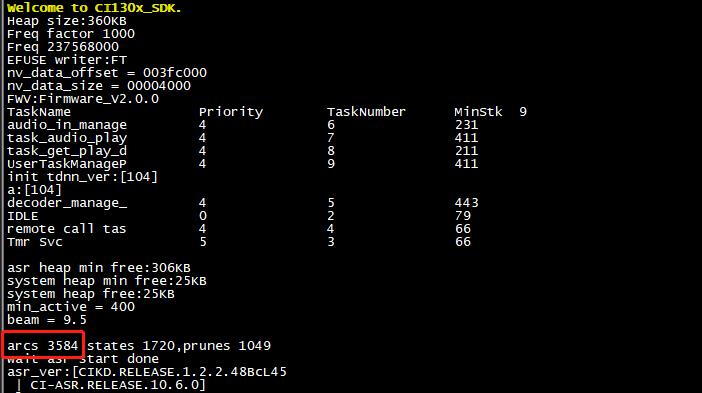
The language model (ASR) currently only supports the Chinese model (except for the low false alarm model). The number of model nodes is recommended to be below 5000 (for example, the number of nodes in the model is 3584 as shown in the boot print in the figure below).
6 Offline Commands Self-Learning Q&A
Q1:How to enter the learning mode?
A1:Wake up after (the standard demo wake-up word is “intelligent manager”), say the command word “Learn Wake Word” or “Learn Command Words” to enter the learning mode.
Q2:How to exit the learning mode?
A2:There are two ways to exit the learning mode. The first way is to exit the learning mode actively. Wake up after, enter the learning mode, and through the command word “Exit Learning” can exit the registration mode. The second way is that after each successful learning, the system will automatically exit the learning mode and enter the recognition mode.
Q3:If there is no feedback when entering the learning mode, how to handle it?
A3:Reason one: It may be too quiet, and the VAD threshold is raised during learning. Solution: Keep a distance of 0.5 meters from the device and learn with a clear voice. Reason two: The system has exited the wake-up state. Solution: Wake up after and re-enter the learning mode.