SDK baud rate calibration function
1. Functional characteristics
- Only when the SDK is configured to use an internal crystal oscillator, the baud rate calibration function can be enabled.
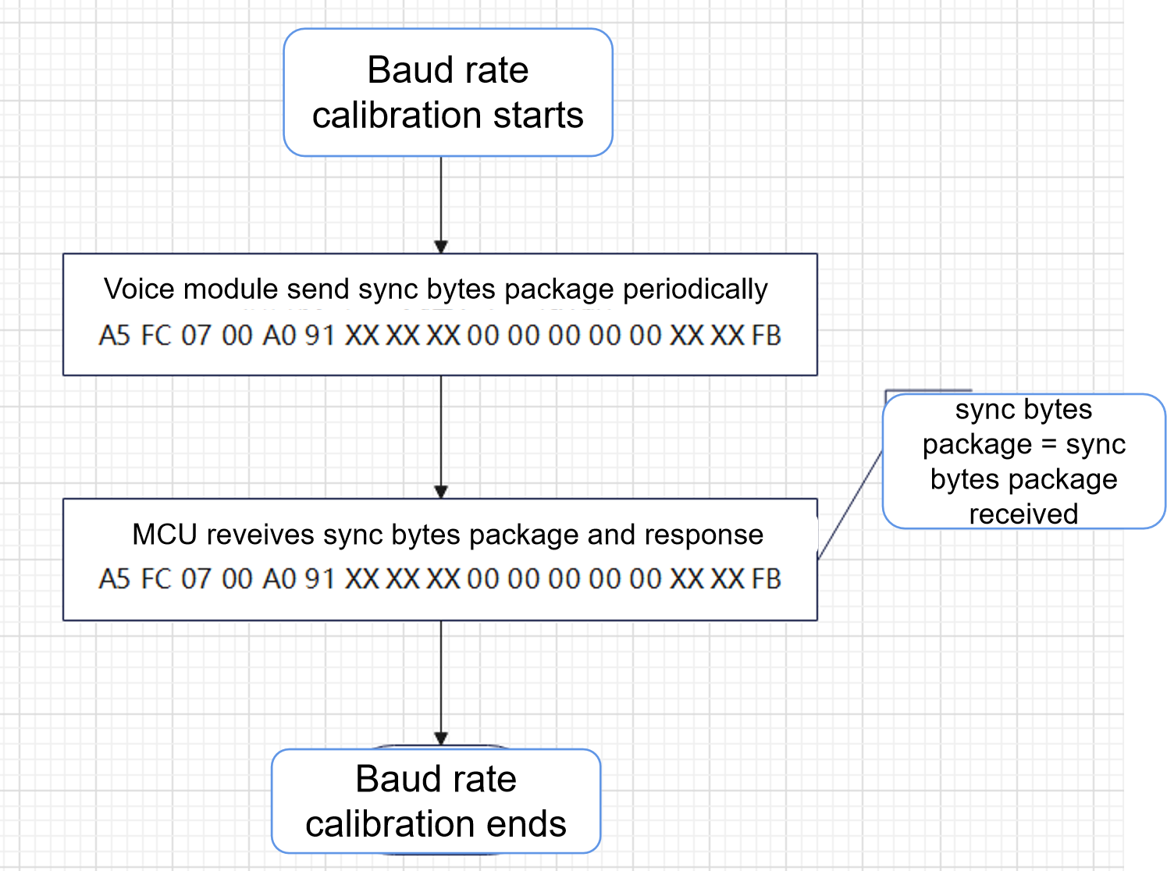
- Enable baud rate calibration, and at the same time, enable the UART protocol of the SDK. A command will be sent regularly to the communication client (hereinafter referred to as the client). The communication client will reply to the same command within the timeout period to achieve real-time baud rate calibration. The voice module protocols V1 (first generation protocol) and V2 (second generation protocol) included in the SDK all have this function.
- The interval time of baud rate calibration frequency can be configured, and the timeout time for waiting for reply can also be configured.
- The protocol command of baud rate calibration can be modified and customized.
- This function is only supported in V3 SDK V1.5.7 and above.
2. SDK configuration and usage
2.1 Enable internal RC function
Configure to use internal RC in “user_config.h”
#define USE_EXTERNAL_CRYSTAL_OSC 0//0: use internal RC, 1. use external crystal oscillator
2.2 Enable baud rate calibration function
In user_config.h, configure to enable the baud rate calibration function, the sending interval, and the maximum waiting time for receiving replies
#define UART_BAUDRATE_CALIBRATE 1//Enable the baud rate calibration function
#define BAUDRATE_SYNC_PERIOD 180000//Baud rate synchronization cycle, in milliseconds (transmission interval)
#define BAUD_CALIBRATE_MAX_WAIT_TIME 400//The timeout time for waiting for the feedback packet, in milliseconds (the time for receiving the reply)
**Note* *: The above configuration means that a baud rate calibration command will be sent to the communication client every 180000 milliseconds (180 seconds). The communication client needs to reply within 400 milliseconds. If the timeout occurs, the calibration fails.
**Note * *: When configuring as described above, if the client wants to receive a completely correct power-on notification protocol, please be sure to reply to the calibration feedback package within 400 milliseconds. The time to wait for a feedback packet should be less than 400ms as many calibration requests will be initiated each time to avoid excessive calibration time.
2.3 Setting Synchronization Commands (SDK comes with its own UART protocol)
If you use the communication protocol that comes with the SDK and have implemented the command sending and receiving functions, you only need to add or modify in the “Command Word Information Table” ($SDK/projects/ofline_asr_sample/firmware/user_file/cmd_info/[60000]cmd_info.xlsx), as shown below:
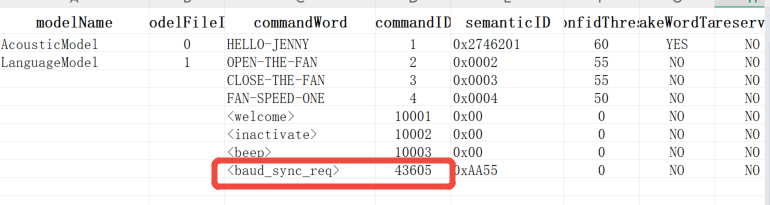
The SDK’s built-in UART protocol will send this command as a voice recognition result command as a baud rate synchronization command. When the client parses this command word ID, it needs to return the original command data without any modification. If you use the SDK’s built-in UART protocol, the baud rate calibration function has been configured. If you use a custom UART protocol, please continue to read.
2.4 Modification related to user-defined UART protocol
2.4.1 Module Initialization
When initializing the user-defined protocol, you need to call the baud rate calibration module initialization function:
//UARTx: serial port number.
//Baudrate: the default baud rate.
//send_sync_req_func: The synchronization command sends the callback function pointer, and the baud rate calibration module sends the synchronization command by calling this function pointer.
void baudrate_calibrate_init(UART_TypeDef *UARTx, uint32_t baudrate, send_sync_req_func_t send_sync_req_func);
2.4.2 Implement synchronous command sending interface
Implement the synchronous command sending interface, so that it can be passed to the baud rate calibration module as the last parameter of the baudrate_calibrate_init function. The baud rate calibration module sends the synchronization command by calling this function pointer.
Because the generation, sending and receiving of synchronization commands are completed by the UART protocol module, it can be flexibly customized. You can design synchronization commands and write them in code in the form of constants.
2.4.3 Add synchronous command processing in the receiving command processing logic
In baud rate calibration, the UART protocol module is still required to receive synchronization commands. When the baud rate synchronization command is received, the baud rate calibration module is notified by calling the interface:
void baudrate_calibrate_set_ack();
So far, the baud wave rate calibration function has been configured.
3、Electronic control coordination with adaptive baud rate
3.1、Flow chart of baud rate adaptation
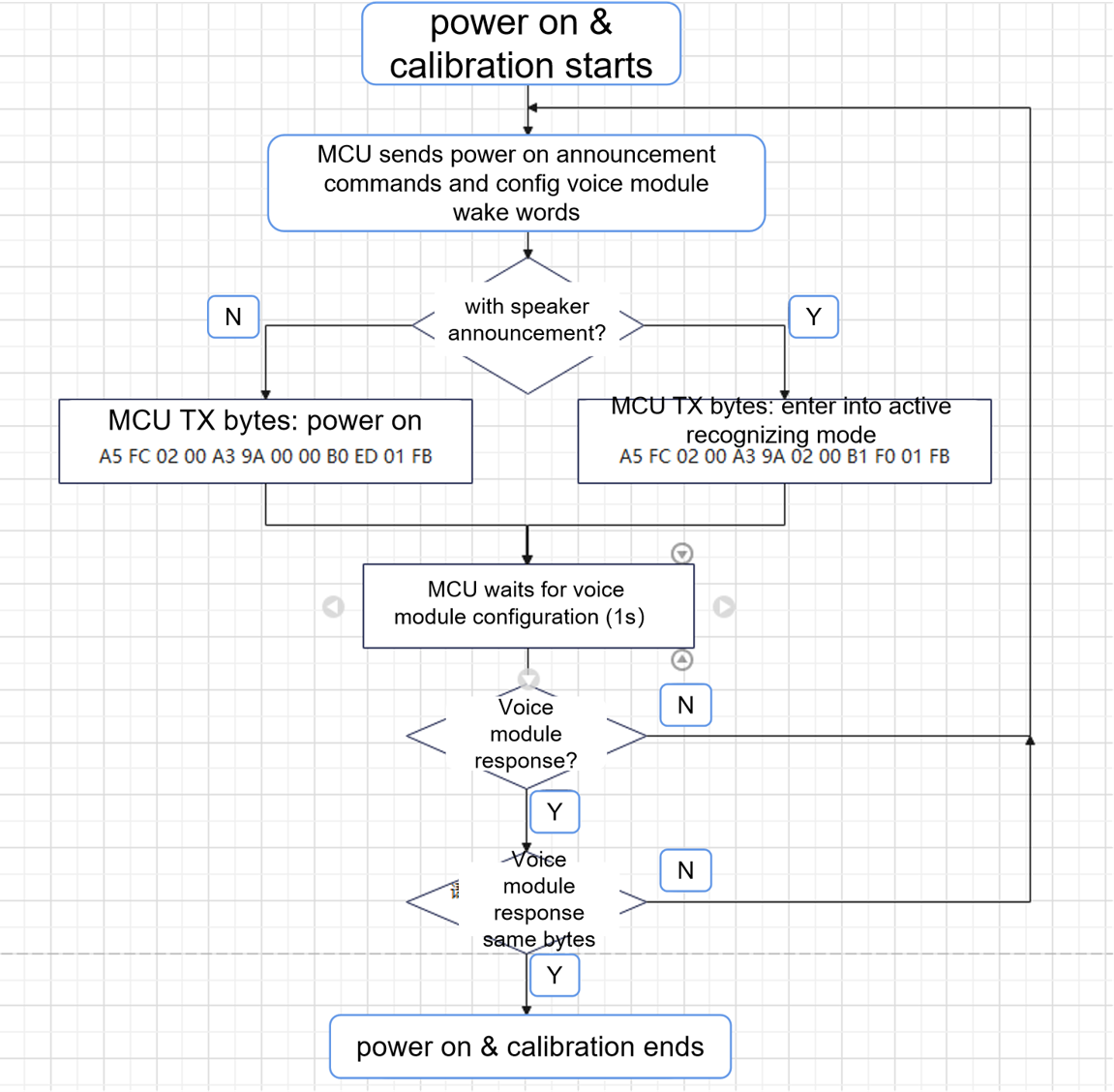
3.2、If the startup sound of the product is determined based on the electronic control, the flow chart for playing attention when powering on is as follows