SDK Software Structure
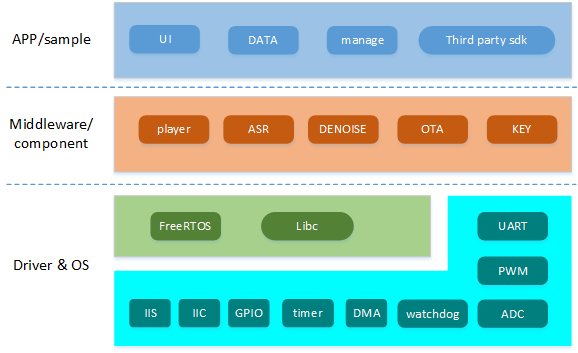
1. SDK Software Structure Diagram
2. SDK directory structure
--Components//Function components
----Asr//Speech recognition
----Alg//Speech preprocessing algorithm library
------Denoise//Noise reduction
----Assist//Auxiliary functions, such as timing functions for testing algorithms
----audio_in_Manage//Audio collection real-time task
----audio_pre_rslt_iis_out//Speech preprocessing result output component
----ci_Nvdm//Non-volatile Data Management
----cmd_Info//Firmware information analysis
----codec_Manage//Codec Manager
----Fft//fft manager
----flash_control//flash manager
----flash_Encrypt//Flash encryption policy
----freertos//Operating system
----Led//Three color light control manager
----Log//Log printing
----msg_Com//Serial port protocol
----Ota//OTA upgrade
----Player//player
----RISCV//RISCV related
----sys_Monitor//System monitor
--Projects//Application example code
----offline_asr_Sample//ci130x template project
--Driver//driver
----Boards//Board level support, such as 1302/1306
----ci130x_chip_Driver//Internal driver of the chip, such as IIC driver
----third_device_Driver//External driver, such as external codec driver ES8388
--Startup//Start code
--system//Unified header definitions
--tools//Firmware building tool
--Utils//Debugging tool set
3. SDK User Code Description
The SDK user code area is shown in Figure 3-1 below:
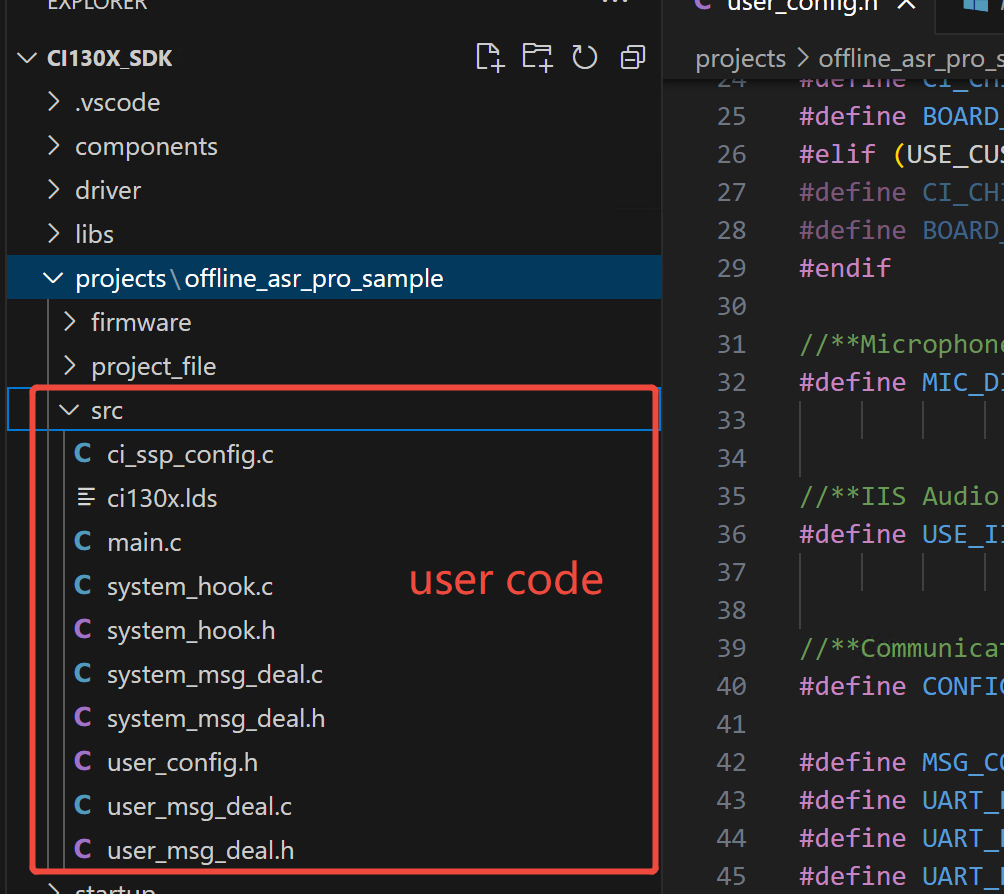
Directory of the following files: CI130X_SDK\projects\offline_asr_sample\src\
| Filename | Description |
|---|---|
| sample_main.c | File of main function: including task creation, platform initialization and system startup code |
| system_hook.c | Event hook interface c file: system startup, wake-up, exit wake-up, voice recognition event hook function |
| system_hook.h | Event hook interface h file |
| system_msg_deal.c | System message processing task c file |
| system_msg_deal.h | System message processing task h file |
| user_config.h | User configuration macro definition H File |
| user_msg_deal.c | User code C File: UART protocol, IIC protocol, key message and other user processing |
| user_msg_deal.h | User code H File |
4. Add code examples
(1) Add protocol and other processing codes for wake-up words, and find CI130X_SDK\projects\offline_asr_sample\src,
- First, add the processing interface declaration in
user_msg_deal.h, for example:
void wake_up_xxx_deal(void);
- Then, add the processing interface definition in
user_msg_deal.c, for example:
void wake_up_xxx_deal(void)
{
/*Processing interface logic code*/
}
- Finally, call the interface in
system_hook.c, for example:
__WEAK void sys_weakup_hook(void)
{
#if MSG_COM_USE_UART_EN
vmup_send_notify(VMUP_MSG_DATA_NOTIFY_WAKEUPENTER);
#endif

/*Add processing interface call here*/
wake_up_xxx_deal();
}
Note
Other states of the system (system startup, system exit wake-up, voice recognition) can also refer to the above methods to add codes, but they need to be called in the corresponding event hook function.
(2) Add processing code according to the command word ID, and find deal_asr_msg_by_cmd_Id function under CI130X_SDK\projects\offline_asr_sample\src\user_msg_deal.c.
The corresponding command word of the command word ID is determined by CI130X_SDK\projects\offline_asr_sample\firmware\user_file\cmd_info\[60000]cmd_info.xlsx specifies
uint32_t deal_asr_msg_by_cmd_id(sys_msg_asr_data_t *asr_msg, cmd_handle_t cmd_handle, uint16_t cmd_id)
{
    uint32_t ret = 1;
    int select_index = -1;
    switch(cmd_id)
    {
        case 2://"Turn on the air conditioner"
        {
            /* Add processing code here based on the command word ID */
            break;
        }
        /* Add case to handle command word ID */
        /* Some code omitted */
        default:
            ret = 0;
            break;
    }
    /* Some code omitted */
}
(3) Add processing code according to semantic ID, and find deal_asr_msg_by_semantic_Id function under CI130X_SDK\projects\offline_asr_sample\src\user_msg_deal.c.
For more semantic ID information, you can visit ☞CI130X Semantic ID Description Document page
uint32_t deal_asr_msg_by_semantic_id(sys_msg_asr_data_t *asr_msg, cmd_handle_t cmd_handle, uint32_t semantic_id)
{
    uint32_t ret = 1;
    if (PRODUCT_GENERAL == get_product_id_from_semantic_id(semantic_id))
    {
        uint8_t vol;
        int select_index = -1;
        switch(get_function_id_from_semantic_id(semantic_id))
        {
        case VOLUME_UP:        // Increase volume
            vol = vol_set(vol_get() + 1);
            select_index = (vol == VOLUME_MAX) ? 1:0;
            break;
        case XXX_XXX:
            /* Add processing code here based on semantic ID */
            break;
        /* Add case to handle semantic ID */
        /* Some code omitted */
        default:
            ret = 0;
            break;
        }
        /* Some code omitted */
    }
    /* Some code omitted */

}
5. SDK Code Logic Analysis
Due to the specific needs of the speech recognition system, the SDK has included a lot of initialization work. In order to help users become more familiar with the code structure process, the program startup process and working status are briefly described.
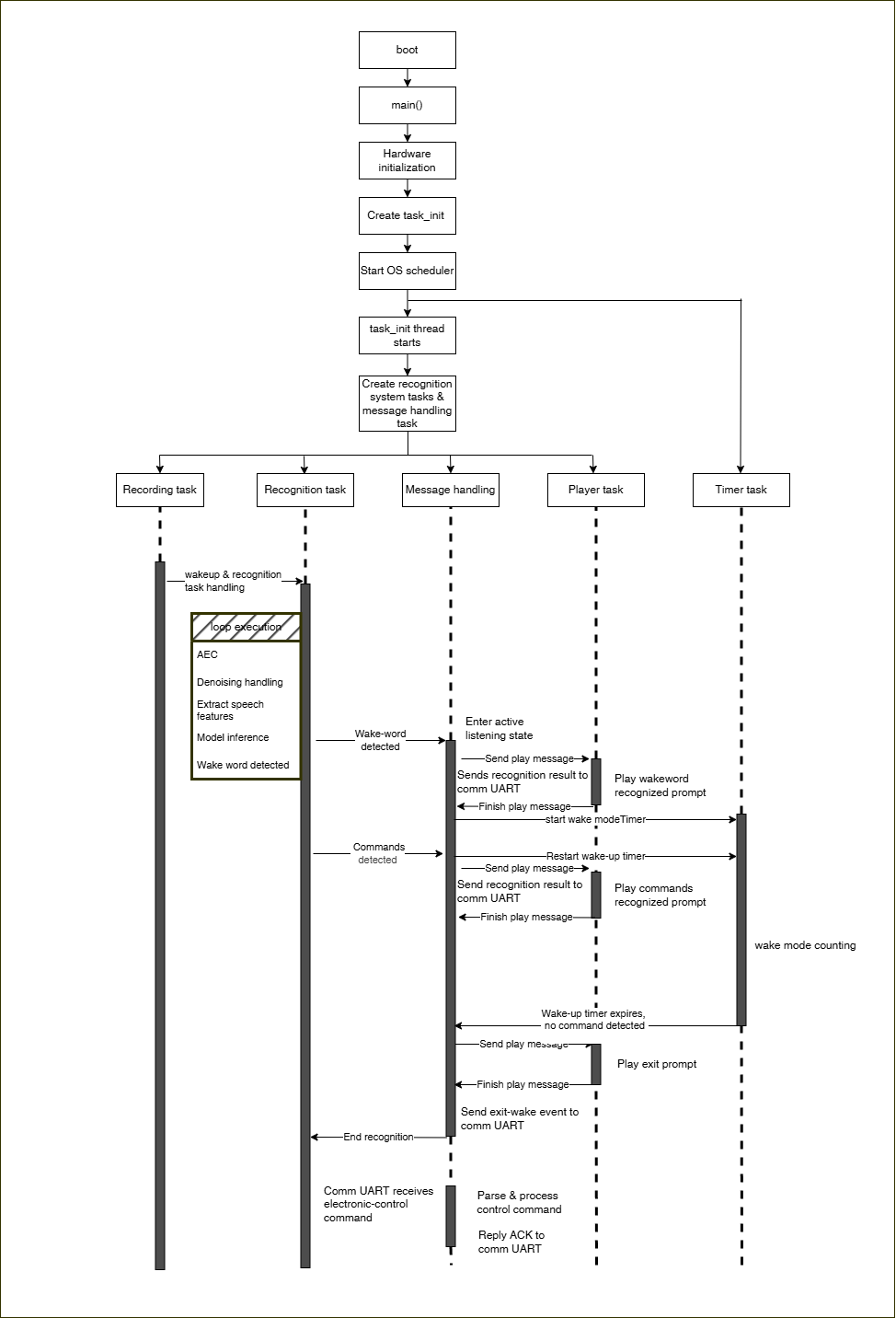
As shown in the figure above, after the system is powered on and started, enter the main function to initialize relevant hardware, and then create a vTaskCreate thread to start the FreeRTOS system. The vTaskCreate thread will create relevant threads for recognition and broadcast, and then the system will enter the sleep state and collect voice input.
When the correct voice is input to the recognition thread, the recognition thread will send the message to the user thread through the message queue mechanism for processing. In the user thread of the SDK, some operations have been completed, such as playing the corresponding broadcast voice, switching the system state, sending the UART protocol, etc. The user generally only needs to add the code in the user thread when adding the code, Therefore, understanding the message processing mechanism in the user thread can easily extend the function.
When the external communication UART sends a protocol to control the voice board, the UART protocol will be parsed in the UART interrupt. After successful parsing, the vmup_port_send_packet_rev_msg function will be called in the interrupt to send a UART message to the user thread. Upon receiving this message, the user thread will sequentially call deal_userdef_msg >> userapp_deal_com_msg >> userapp_deal_cmd to execute the function synchronously or asynchronously (most are synchronous, but playing voice prompts are asynchronous requests), and send back an ACK to the communication UART upon completion.