CI130X Semantic ID Description
1. Overview
The CI130X chip SDK adds the concept of semantic ID. In order to facilitate developers to quickly develop the SDK, this article aims to explain the semantic ID protocol and its use.
2. Semantic ID
2.1. Uniqueness
The semantic ID of each command word is unique, facilitating interaction between multiple products.
2.2. Convenient command word processing of the same function
Generally, in specific product applications, there are different expressions of the same meaning, such as “increase the volume”, “louder”, “volume up”, “turn up the volume”, etc. During the development process, developers may add or delete some words at any time, and the code maintenance is cumbersome. The semantic ID of the command word is a good solution to this problem. Developers only need to modify the command word EXCLE table and language model, and do not need to modify the code.
3. Details of semantic ID protocol
-
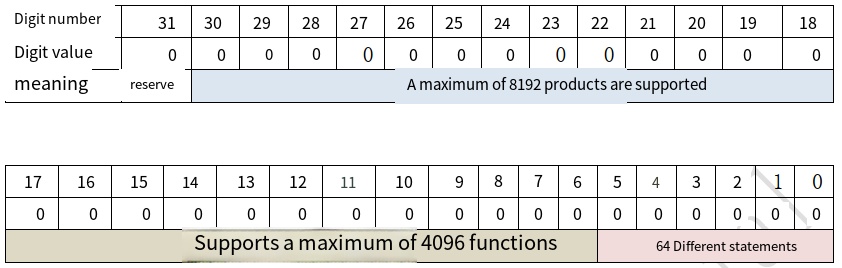
The semantic ID has a total of 4 bytes (32 bit), and the highest bit is reserved.
-
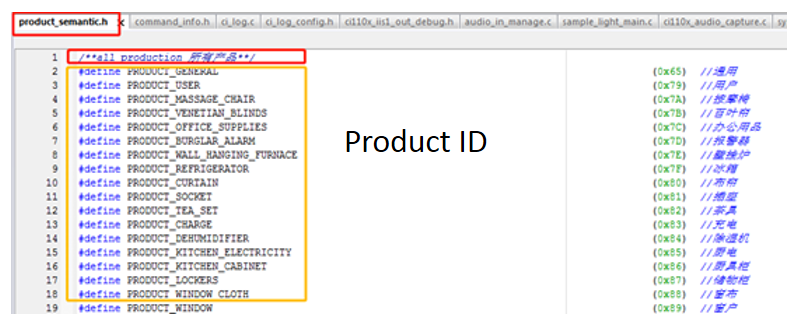
Bits 18 to 30: Product ID. Supports up to 8192 distinct products. For example, “turn on the AC” and “turn on the fan” can be distinguished by the AC (ID: 0xAF) and fan (ID: 0x9D) IDs, respectively. The specific definition of the Product ID in the
product_semantic.hfile is shown in the figure below.
Note
The product ID contains general (ID: 0x65) instructions, such as volume adjustment and broadcast control.
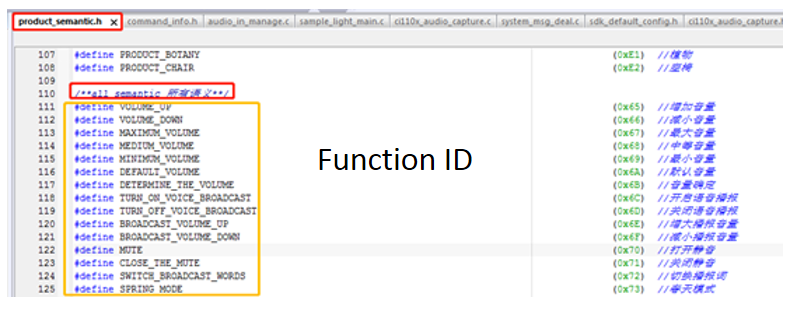
- Bit 6 to 17: Function ID. Up to 4096 functions are supported.
For example, “loud voice” and “low voice” belong to different functions, and their function IDs are different. “Loud voice” and “Increase volume” belong to the same function, and their function IDs are the same, facilitating the processing of command words with the same function. The function ID is defined in the product_semantic.h file:
- Bit 0 to 5: express ID. Up to 64 different expressions are supported.
For example, the function of words such as “louder”, “louder” and “louder” is to increase the volume. Their product ID and function ID are identical, but the only difference is the expression ID. ID is expressed to support semantic ID uniqueness. If the developer does not consider uniqueness, it can be ignored.
4. Specific Description of Semantic ID
4.1. Semantic ID Function
//Get Product ID

get_product_id_from_semantic_id(semantic_id);

//Get function ID

get_function_id_from_semantic_id(semantic_id);
4.2. Semantic ID File
The command semantic ID is provided by our company, which is unique. When developer packages Firmware\user\file\cmd_info[60000] xxx.xls command file, [60000] xxx.xls semantic ID will be automatically generated. As shown in the figure below:
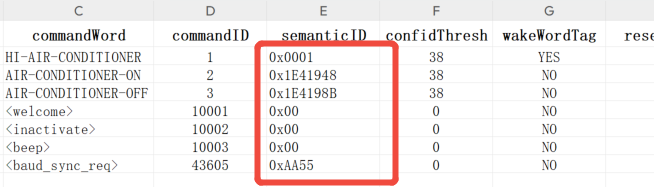
The path of the semantic ID header file is SDK\components\cmd_info\product_semantic.h.
5. Example code of semantic ID
5.1. Common Semantic ID Example Code
#define  PRODUCT_GENERAL (0x65)//General (semantic ID header file has been defined)
uint32_t semantic_id = 0x19419C4;   // Maximum volume semantic ID (command word Excel table)
//Get Product ID
if(PRODUCT_GENERAL==get_product_id_from_semantic_id(semantic_id))
{
//Get function ID
switch(get_function_id_from_semantic_id(semantic_id))
{

case VOLUME_UP://Increase the volume
break;
case VOLUME_DOWN://Decrease the volume
break;
case MAXIMUM_VOLUME://Maximum volume
vol_set(VOLUME_MAX);
break;
case MEDIUM_VOLUME://Medium volume
vol_set(VOLUME_MID);
break;
case MINIMUM_VOLUME://Minimum volume
vol_set(VOLUME_MIN);
break;
default:
break;
}
}
The above example code is the general control of products. Multiple products can use the same code to speed up code development.
5.2. Example code of lamp control semantic ID
#define PRODUCT_LAMP_CONTROL (0x8D)//Light control (semantic ID header file has been defined)
uint32_t semantic_id = 0x234DF84;  //Maximum brightness semantic ID (command word Excel table)
//Get Product ID
if(PRODUCT_LAMP_CONTROL==get_product_id_from_semantic_id(semantic_id))
{
//Get function ID
switch(get_function_id_from_semantic_id(semantic_id))
{
case MAXIMUM_BRIGHTNESS_OF_LIGHT://Highest light brightness
break;
case MODERATE_BRIGHTNESS://Medium brightness
break;
case MINIMUM_BRIGHTNESS_OF_LIGHT://Minimum light brightness
break;
case TURN_UP_THE_LIGHT://Turn on the light
break;
case DIM_THE_LIGHT://Turn down the light
break;
case RED_MODE://Red mode
break;
case GREEN_MODE://green mode
break;
case BLUE_MODE://Blue mode
break;
case COLORFUL_MODE://Color mode
break;
default:
break;
}
}
6. Example of user-defined semantic ID
6.1. Fill in the user-defined semantic ID
- Developers packages
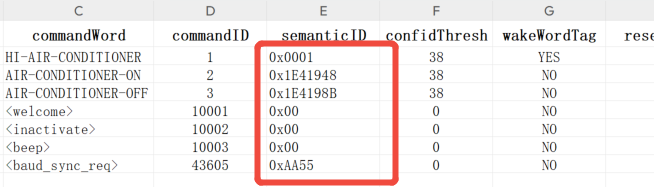
SDK\projects\sample_xxx\firmware\user_file\cmd_Info[60000]xxx.xlscommand word list file,[60000]xxx.xlssemantic ID will be automatically generated. If the generated default semantic ID is shown in the following figure.
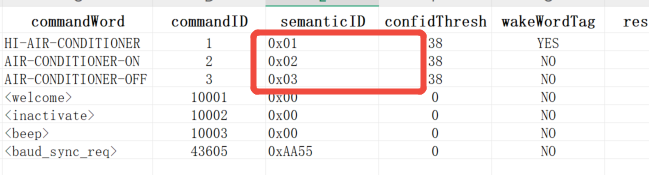
- The semantic ID in the user-defined modification
[60000]xxx.xlstable is shown in the following figure.
6.2. Make Custom Semantic ID Valid
- Open the
cmd_info.batfile undercmd_infodirectory. Information below are as follows.
if exist *.bin (del *.bin)

..\..\..\..\..\..\tools\cmd_info. exe --no-cmd-id-duplicate-check -c

if exist *.bin goto label_ok
echo cmd_info failed
..\..\..\..\..\..\tools\cmd_info_err.exe
goto end

:label_ok
echo cmd_info ok

:end
- Modify the second line of
cmd_info.batfile, remove the last character “-c”, save and close the file.
!!! Note “Notes”
1. Remove “-c” character in the second line of the cmd_info.bat file can prevent the generation of the default semantic ID when calling make_parttion_bin.bat, making the user defined semantic ID valid.
2. The user can test the effect of not removing the “-c” character, that is, after calling make_partition_bin.bat, the custom semantic ID will disappear and become the default semantic ID.
- Back to
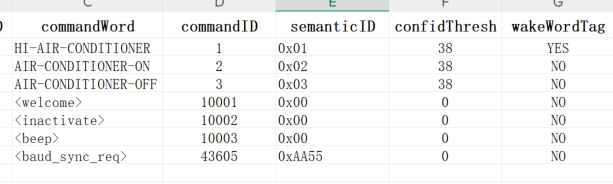
SDK\projects\sample_xxx\firmwaredirectory. Double click themake_partition_bin.batfile. After the program runs, look back at[60000]xxx.xls. The custom semantic ID is generated successfully.
6.3. Validation results
- You will find the following code in
SDK\projects\sample_xxx\src\system_msg_deal.cfile to obtain the semantic ID verification results.
void sys_deal_asr_msg(sys_msg_asr_data_t *asr_msg)
{
cmd_handle_t cmd_handle;

if(MSG_ASR_STATUS_GOOD_RESULT == asr_msg->asr_status && (ignore_asr_msg==0))
{
/*Omit codes*/

cmd_handle = asr_msg->asr_cmd_handle;

/*Omit codes*/

/*Get the semantic ID, and verify the result according to the print*/
uint32_t semantic_id = cmd_info_get_semantic_id(cmd_handle);
ci_loginfo(LOG_USER,"semantic_id:%08x\n",semantic_id);

/*Omit codes*/
}

/*Omit codes*/
}