Quick Start Guide
Overview
This document aims to assist developers in quickly getting started with developing an offline speech recognition firmware using the CI13XX series voice AI chips and the ☞Offline Speech Recognition SDK (CI-SDK-ASR-Offline). The content includes: 1) Setting up the CI-IDE (Chipintelli Integrated Development Environment) and downloading the SDK; 2) Developing a speech recognition firmware using the established IDE environment and SDK, in combination with Chipintelli’s ☞AI Speech Development Platform; 3) Utilizing the tools provided by the IDE and SDK for code editing, compilation and linking, firmware generation, and download debugging. This process, combined with the HDT (Hardware Development Toolchain), enables firmware downloading to development boards, board-level communication verification, log printing, and audio data analysis, completing the entire development process from environment setup to project compilation and board verification.
Note
-
Offline Speech SDK (Offline Speech Software Development Kit) supports only Chipintelli’s single-microphone offline speech recognition and does not include other algorithms. It is a toolkit that provides software libraries and source code for developing Chipintelli’s CI13XX series AI voice chips, along with rich APIs (Application Programming Interface) and PACK_UPDATE_TOOL for firmware packaging and upgrading. Chipintelli has released specific versions of the ☞Offline Speech Recognition SDK (CI-SDK-ASR-Offline) for different chip series.
-
IDE (Chipintelli Integrated Development Environment) is an application that provides a program development environment, typically including a code editor, compiler, debugger, and graphical user interface tools. Developers need to use the officially recommended IDE to edit, compile, link, and debug the Chipintelli Software Development Kit (Offline Speech Recognition SDK).
-
AI Development Platform (Chipintelli AI Platform) is a comprehensive functional development and management platform based on our intelligent voice chip solutions. The platform URL is: ☞https://aiplatform.chipintelli.com/. The platform includes functional development, development resources, ticket submission, documentation, and sample procurement. Developers must complete registration first.
-
HDT (Hardware Development Toolchain) is a set of hardware tools used for designing, developing, debugging, and validating, covering the entire embedded system development process.
Preparation
This section uses the CI1303 as an example to help developers quickly set up the development environment.
The following diagram illustrates the IDE setup and program uploading process for the CI13XX series voice AI chips:
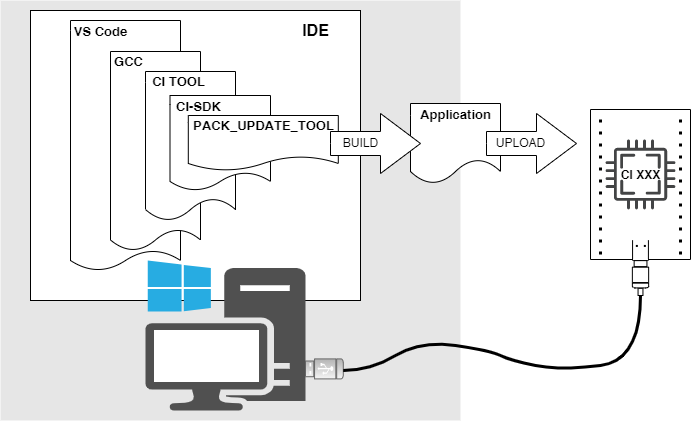
Toolchain Preparation
- CI1303 Development Board Kit (☞CI1303 Development Board Kit Instructions)
Note
-
The CI1303 Development Board includes: CI-D02GS02S module + CI-B02-MB development board base
-
The CI1303 Development Board Kit includes: CI-D03GS02S module + CI-B02-MB development board base + microphone + speaker + serial port debugging tool + audio acquisition board + DuPont wires + USB cable
-
When purchasing a development board from ☞Chipintelli Mall, selecting a “Development Board Kit” includes the complete Hardware Development Toolchain (serial port debugging tool, audio acquisition board) and Hardware Connection Cables (DuPont wires, USB cable). If developers already own a development kit, they only need to purchase other module models separately when replacing chip modules, without needing to repurchase the entire development kit.
-
USB Cable (USB A to USB Type-C, included with the development board kit, no need to purchase separately; if needed separately, click ☞USB Cable Purchase)
-
Serial Port Debugging Tool (used to receive debugging information from the development board or verify serial communication protocols, included with the development board kit, no need to purchase separately; if needed separately, click ☞Serial Port Debugging Tool Purchase)
-
Computer (Windows 10 or higher)
SDK Download
There are two ways to obtain the SDK. Method one is through the “Speech Recognition Firmware and SDK Development” section of Chipintelli’s AI Platform, where you can check the “SDK Download Option” after completing the no-code firmware development process to output the SDK package. Method two is to directly download the standard SDK of a specific version from the official link, which can be used with the API Reference in the documentation center for in-depth programming development.
-
Method 1: For deep customization of the SDK or direct development and generation of speech recognition firmware through the AI development platform, please follow the steps in the AI Platform Product Development Process Guide;
-
Method 2: Directly download ☞CI13XX_SDK_ASR_Offline_V2.2.0.
Note
Method 2 requires developers to have some embedded programming experience.
IDE Setup
To use the Offline Speech SDK in the IDE (Integrated Development Environment), please download and install the following software:
-
☞ Visual Studio Code - Lightweight code editor;
-
☞ GCC Toolchain - Compilation and linking tools for compiling CI13XX series chip project code;
-
CI TOOL - A plugin installed on the lightweight code editor (VSCode), which provides scripts for running the GCC toolchain and other functions;
Note
The CI TOOL plugin is included in the tools directory of the Offline Speech SDK software development package and does not need to be downloaded separately.
Installation
Chipintelli provides the following methods to install the required software.
IDE Setup
The Chipintelli Integrated Development Environment consists of the following components:
- VSCode + GCC Toolchain + CI TOOL + PACK UPDATE TOOL
Please click ☞IDE Setup and Usage for detailed steps.
HDT Installation
The Chipintelli Hardware Development Toolchain consists of the following components. For installation steps, please refer to the instructions in the notes:
- Serial port debugging tool + Audio acquisition board
Note
-
☞ Click to view UART Serial Port Debugging Tool User Guide
-
☞ Click to download Audio Acquisition Board Operation Guide
-
USB cables, DuPont wires, and other hardware connection cables are not considered part of the Chipintelli HDT (Hardware Development Toolchain)
Compiling Firmware
Method 1: No-code development based on the AI development platform. Please click AI Platform Product Development Process Guide;
Tip
☞ Developers can click to view the video tutorial for detailed operation steps
Method 2: Programming Development Based on Offline Speech SDK
-
After setting up the IDE (Integrated Development Environment), please follow ☞SDK Quick Start to compile your first project;
-
After successfully running the first project on the development board, if developers need to modify wake words and command words according to specific project requirements, they should follow the steps in ☞Command Words and Firmware Production Guide;
-
To package the final .bin firmware that can be programed to the development board, follow the specific steps in ☞SDK Quick Start, such as “Packaging 5 bin files into one bin file”.
Tip
☞ Developers can click to view the video tutorial for detailed operation steps
Firmware Download and Testing
-
Development Kit Setup: Follow the “Hardware Connection” steps in ☞SDK Quick Start to properly connect the development board, microphone, speaker, and computer according to the connection instructions;
-
Firmware Download: Follow the “Firmware Update” steps in ☞SDK Quick Start to download the speech recognition firmware to the development board;
-
Testing and Experience: Follow the “Firmware Verification” steps in ☞SDK Quick Start to understand concepts such as power-on announcement sounds, wake words, command words, wake-up time, and wake-up duration, and experience the charm of offline speech recognition functionality.